
Скриншоты
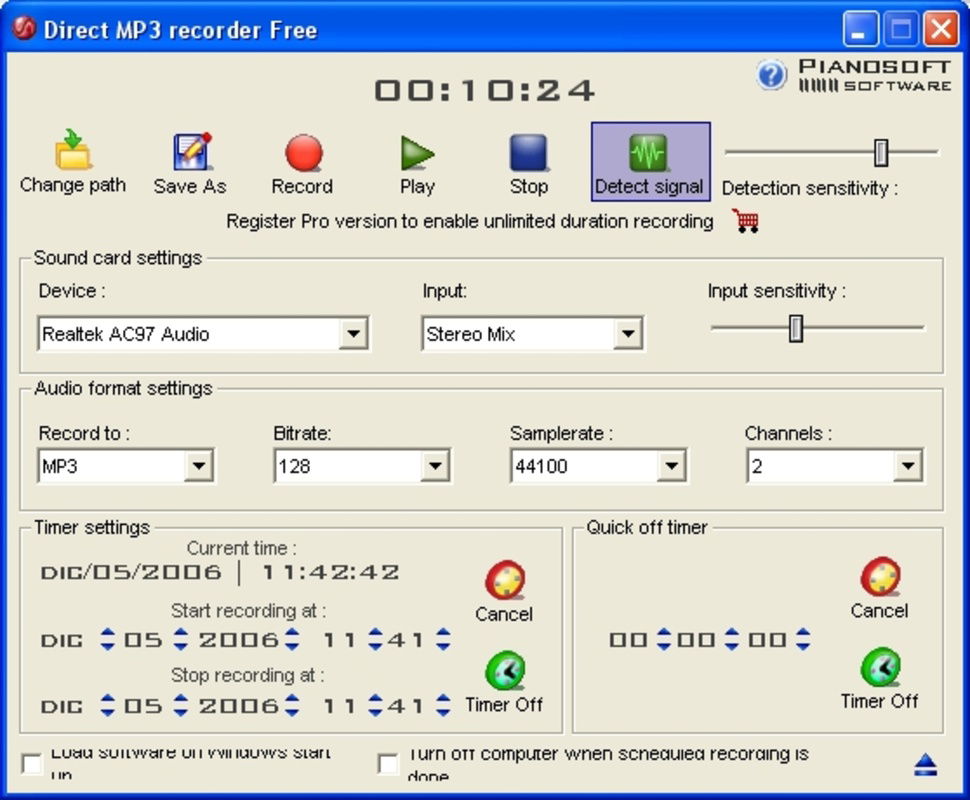
Сведения о приложении
- Обновлено
- Nov 12, 2020
- Язык
- English
- Разработчик
- Pianosoft
- Категория
- Mobile
SoftPas на:
Этот продукт также доступен на следующих языках:
О Direct MP3 Recorder Free
Скачать Direct MP3 Recorder Free – захват аудио, MP3, OGG, WAV, WMA
Обзор
Direct MP3 Recorder Free — это мобильный инструмент захвата аудио, разработанный для упрощения процесса записи звука непосредственно из аудиоисточников устройства. Приложение служит утилитой для пользователей, которым необходимо записывать голос, музыку или системный звук с минимальной настройкой. Его основная цель — обеспечить надёжный захват аудио с разных типов входов, делая его подходящим для студентов, создателей контента, подкастеров и обычных пользователей, которым нужны возможности записи на ходу.
Приложение решает распространённые проблемы записи аудио, такие как сложная навигация, ограниченная поддержка форматов и отсутствие функций планирования. Предоставляя простой доступ к функциям записи и нескольким форматам вывода, оно уменьшает трения в рабочем процессе записи. Включённая функция запланированного выключения также помогает управлять ресурсами устройства во время длительных сеансов, что особенно полезно для фоновых записей или ограниченных по времени захватов.
Целевые пользователи включают людей, которые используют аудио для документирования, учебных заметок, интервью или личных проектов. Хотя разработчик не предоставил дополнительной информации о себе, дизайн приложения указывает на акцент на удобстве использования и доступности. Реальные сценарии использования включают захват лекций, запись живых выступлений или архивирование аудио из потоковых сервисов. В более широком экосистеме приложений Direct MP3 Recorder Free заполняет нишу лёгких, без излишеств аудио‑инструментов, которые ставят функциональность выше продвинутых функций редактирования.
Ключевые функции и возможности
- User-Friendly Interface: The app features a clean, intuitive layout that prioritizes ease of access. Even users unfamiliar with audio recording software can begin capturing sound immediately without extensive tutorials.
- Multi-Format Support: Direct MP3 Recorder Free supports four audio formats: MP3, OGG, WAV, and WMA. Each format allows users to adjust quality settings, enabling optimization for file size or audio fidelity based on their needs.
- Flexible Input Sources: Users can select from various input sources, including the system microphone, real-time audio playback, line-in, and phone line. This versatility supports diverse recording environments, from voice memos to live audio capture.
- Scheduled Recording & Auto Shutdown: The app allows users to set recording schedules and automatically shut down both the application and the device after completion. This is particularly useful for overnight recordings or unattended sessions.
For example, a student might use the app to record a lecture via system audio while attending class remotely, then schedule the app to shut down after the session ends. A podcaster could use the line-in option to record from an external microphone and save the output in WAV for high-quality post-production. The ability to switch between formats ensures compatibility with different platforms and devices.
Interface, UX & Performance
The user interface of Direct MP3 Recorder Free is designed with simplicity in mind. Navigation is linear and consistent, with key functions such as start, stop, and format selection clearly labeled and accessible from the main screen. Visual feedback during recording, such as waveform visualization or status indicators, enhances user awareness of ongoing activity.
Interaction flow is straightforward: users select an input source, choose a format and quality, set any scheduled parameters, and begin recording with a single tap. The app maintains responsiveness across different device categories, though the developer did not list formal performance metrics. Although the developer did not list formal performance metrics, the app appears to function reliably during standard recording tasks.
Stability during long sessions is supported by the automated shutdown feature, which helps prevent overheating or unnecessary battery drain. The app does not appear to consume excessive system resources, suggesting efficient background operation. However, specific performance data, such as battery usage or CPU load, were not disclosed. Overall, the user experience is consistent with tools designed for basic audio capture, focusing on reliability and minimal interruptions.
Platform Compatibility & Technical Requirements
Direct MP3 Recorder Free is available for Android and iOS platforms, though specific OS version requirements were not listed. The app has a file size of 12.5 MB, which suggests it is lightweight and suitable for devices with limited storage capacity. Users should ensure their device meets the necessary system specifications, although detailed technical requirements were not provided by the developer.
Compatibility information was not fully disclosed, so users are advised to verify the app’s functionality on their specific device model. The developer did not specify minimum OS versions or hardware capabilities required for optimal performance. Despite this, the app’s small size and focus on core recording features indicate broad compatibility across a range of smartphones and tablets.
Pros and Cons
Pros
- Simple, intuitive interface ideal for beginners and non-technical users.
- Supports multiple audio formats including MP3, OGG, WAV, and WMA.
- Flexible input options for diverse recording scenarios.
- Automated shutdown feature helps conserve battery and system resources.
- Lightweight design with a small file size of 12.5 MB.
Cons
- Specific OS requirements and device compatibility details were not listed.
- Developer did not provide information on performance metrics or battery usage.
- Limited editing or metadata features beyond basic recording.
- No mention of cloud sync, backup, or export options to external services.
- Availability on iOS was not confirmed in detail.
FAQ
Is Direct MP3 Recorder Free safe to install?
The app is designed as a free audio recording utility and does not require excessive permissions. It is recommended to download from official app stores to ensure authenticity and security.
Can I record audio from my phone’s speaker?
Yes, the app supports recording from real-time playback, which allows users to capture audio being played through the device’s speaker.
Does the app support background recording?
While the developer did not specify background recording behavior, the scheduled shutdown feature suggests it can operate during extended sessions, likely supporting background functionality.
Is there a paid version with more features?
The provided information does not indicate the existence of a premium version. The app is distributed as a free tool with no mention of in-app purchases or upgrades.
How do I update the app?
Updates are typically delivered through official app stores. Users should check their device’s app store for the latest version of Direct MP3 Recorder Free.
Final Thoughts
Direct MP3 Recorder Free stands out as a dependable, no-nonsense audio capture tool tailored for users who value simplicity and functionality. Its clean interface, multi-format support, and flexible input options make it a practical choice for students, podcasters, and everyday users needing to record audio on the go. The automated shutdown feature adds a layer of convenience for long or unattended sessions, enhancing its usability in real-world scenarios.
While the app lacks advanced editing tools and detailed technical documentation, it fulfills its core purpose efficiently. For those seeking a lightweight, secure, and easy-to-use mobile app for audio recording, Direct MP3 Recorder Free delivers solid value without unnecessary complexity.
Download Direct MP3 Recorder Free now
Руководства и уроки
Как установить Direct MP3 Recorder Free
- Нажмите кнопку Скачать выше.
- После перенаправления примите условия и нажмите Установить.
- Дождитесь завершения загрузки Direct MP3 Recorder Free на ваше устройство.
Как использовать Direct MP3 Recorder Free
Это ПО в основном используется для основных функций, описанных выше. Откройте приложение после установки, чтобы изучить его возможности.
Отзывы пользователей
Отзывов пока нет. Поделитесь своим опытом первым.
Вам также может понравиться
еще
Que no te pillen¡
About !Que no te pillen¡Reviewed by Jason A. BilbreyShow MoreShow Less

3D Combat Zone
About 3D Combat ZoneOriginally released in 1983, 3D Combat Zone immerses players...

666: El día del portal
About 666: El día del portalOn June 6, 2006, Agent P. Stone uncovers a sinister...

80 in 1 Best Flash games
About 80 in 1 Best Flash games 80 in 1 Best Flash games is a collection of 80 fl...

ABYSS SEEKERーーWhat Do You See Deep in The Abyss
About ABYSS SEEKERーーWhat Do You See Deep in The AbyssIn ABYSS SEEKER, players...

ACA NEOGEO THE KING OF FIGHTERS 2002 for Windows
About ACA NEOGEO THE KING OF FIGHTERS 2002 for WindowsTHE KING OF FIGHTERS 2002,...